Explore laser cut models and professional prototyping with this guide covering design precision, materials, fabrication methods, and practical applications.

In the modern landscape of design and engineering, the distance between a "good idea" and a "tangible product" has never been shorter. The catalyst for this speed? Rapid Prototyping. While 3D printing often dominates the conversation, laser technology has quietly become the MVP of the design studio.
Whether you are looking to build sprawling architectural models with laser precision or you need to test the mechanical fit of a new invention through product prototyping, an OMTech laser machine provides a level of speed, material versatility, and edge quality that other methods simply cannot match.
1. Why Laser Technology is the Best for Prototyping
When choosing the best laser engraver for prototyping, you have to consider the "Three S’s": Speed, Scale, and Substance.
Speed: Unlike 3D printers that build layer-by-layer over hours, a CO2 laser slices through sheets of material in seconds. You can iterate five different designs in the time it takes a 3D printer to finish a single base layer.
Scale: Laser cutters allow you to work with large sheets (up to 24” x 35” or more on mid-range OMTech models), making them ideal for large-scale architectural model laser projects.
Substance: Lasers work with real-world materials—acrylic, wood, leather, and foam—giving your prototype the actual weight and feel of a finished product.
2. Mastering the Craft: How to Laser Cut Models
Learning how to laser cutting models effectively requires a shift in mindset from 3D to 2D. You are essentially creating a "flat-pack" version of your 3D vision.
The "Slicing" Technique
To create a 3D object from flat sheets, designers use "slicing." By taking a 3D digital model and cutting it into horizontal or vertical slices, you can stack the laser-cut pieces to recreate the volume. This is a favorite technique for DIY laser cut models and topographical maps.
Finger Joints and Interlocking Tabs
The secret to structural integrity in laser cut scale models is the use of joinery. By designing tabs and slots into your vector files, you can create "friction-fit" models that require zero glue. This is essential for educational models where students need to assemble and disassemble components to understand structural engineering.
3. Architectural Models with Laser Precision
Architecture is perhaps the most demanding field for model making. Clients expect perfection, and the architectural model laser workflow delivers exactly that.
Intricate Facades: Use the laser to etch brick patterns, window panes, and shingle textures onto basswood before cutting the perimeter.
Context Models: Rapidly cut site topography from corrugated cardboard or foam board to show how a building sits within the landscape.
Massing Studies: Use translucent acrylic to represent "proposed" structures against a wooden background of "existing" buildings for a professional, high-contrast aesthetic.
4. Can Laser Engrave 3D Models?
A common question among beginners is: Can laser engrave 3D models? The answer is a nuanced yes.
While a CO2 laser is primarily a 2D tool, 3D prototype engraving (also known as 2.5D engraving) is achieved through "Grayscale Mapping." The laser software translates the darkness of an image into laser power. Darker areas are engraved deeper, and lighter areas shallower. This allows you to create textured surfaces, bas-reliefs, and ergonomic grips on your prototypes that feel remarkably 3D.
5. Product Prototyping and Rapid Iteration
In the world of product prototyping, "failing fast" is the goal.
Functional Testing: Need to see if a circuit board fits in a housing? Cut a prototype from 3mm MDF in 60 seconds.
Control Panels: Engrave labels, logos, and button cutouts onto a single sheet of dual-color acrylic (lamicoid) for a prototype that looks like a finished retail product.
Gaskets and Seals: Use the laser to cut custom rubber or silicone gaskets for waterproof testing in mechanical assemblies.
6. Educational Models: Bringing the Classroom to Life
Using a laser for educational models transforms abstract STEM theories into physical reality.
Biology: Engrave high-detail cross-sections of cells or DNA helices.
Physics: Create working gear trains and pulleys to demonstrate mechanical advantage.
History: Reproduce archaeological finds or historical landmarks as laser cut scale models that students can build themselves.
7. Creating Laser Cut Models at Home
You don't need an industrial factory to start prototyping. Machines like the OMTech Polar have made it possible to create laser cut models at home. These desktop-friendly units are fully enclosed, feature built-in cameras for easy alignment, and are quiet enough for a home office or garage.
8. Technical Mastery: Laser Settings for Prototypes
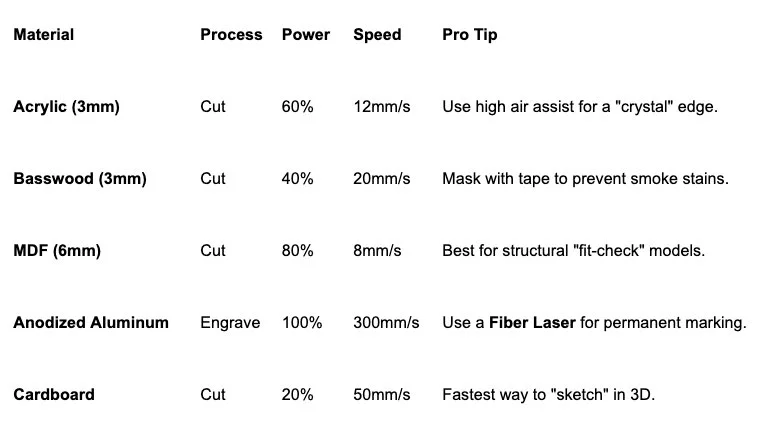
Achieving a professional finish requires dialing in your laser settings for prototypes. Use this guide as your starting point:
9. Advanced Tips for Quick Prototyping with Laser
To truly master quick prototyping with laser technology, consider these pro-level hacks:
The "Living Hinge": You can make wood and acrylic bend by cutting a specific pattern of parallel lines. This allows you to create curved prototypes out of flat, rigid materials.
Color Coding Layers: In your design software (like LightBurn), use different colors for "Engrave," "Score," and "Cut." Always set the laser to engrave first and cut last so the pieces don't shift.
Kerf Compensation: Every laser beam has a width (the "kerf"). If you need a part to be exactly 10mm, you may need to offset your line by 0.1mm to account for the material the laser burns away.
10. The Future of Design: Laser Engraved Prototypes
The rise of laser engraved prototypes has democratized invention. No longer is prototyping reserved for companies with million-dollar budgets. Today, a designer with an OMTech laser can produce a prototype on Monday, iterate on Tuesday, and have a final product ready for a Kickstarter launch by Friday.
Start Your Prototyping Journey
Whether you are building a 1:100 architectural model, a DIY laser cut model for your home, or a product prototype that will change the world, the laser is your most powerful ally. It provides the precision of a machine with the soul of a craftsman.
Stay up to date with our latest ideas!